A coding agent that can click inside the Firefox you already use is convenient for one reason: your logins are already there. That convenience is also the security decision. The agent does not mint a new identity; it borrows yours—cookies, SSO, open admin tabs, and whatever password-manager autofill the page can see.
This article is a decision document for engineers wiring Claude Code, Codex, or OpenCode to a browser MCP. The axis is shared human session versus separate automation browser. Kitsune is one concrete Firefox-family implementation of the shared-session pattern—not a soft launch post. The comparison set is Kitsune, firefox-bridge / Agent Bridge–class tools, Playwright MCP, and Claude in Chrome.
What you are actually deciding
Write the decision as one sentence before you register another browser MCP:
Given this task’s need for live logins, will I attach the agent to a real Firefox profile I also use (accepting that cookies and open tabs become agent tool surface), or will I drive a separate automation browser whose sessions I can wipe without touching my daily bank, mail, and work SSO?
If the answer collapses to “just point the MCP at my everyday profile so I do not have to log in again,” you are choosing maximum convenience and maximum blast radius in one stroke. Modes and approvals can shrink what the agent does; they do not shrink what the agent can reach once it reads a malicious page as you.
Two axes—not engine freshness
Shared-session bridges and launched automation browsers solve different trust problems.
Shared human session (extension + local bridge). The agent attaches to Firefox, Zen, or LibreWolf you already have open. Cookies and extensions stay put. Kitsune documents Claude Code, Codex, Pi, and OpenCode on that path—no Playwright/WebDriver install required (Kitsune README). firefox-bridge makes the same class of claim for real logged-in Firefox tabs (firefox-bridge); Firefox Agent Bridge is another WebExtension + native-host design for a live profile (firefox-agent-bridge).
Separate automation browser (Playwright MCP default). Playwright MCP launches a browser it controls. Profiles may be persistent, --isolated (in-memory), seeded from storage state, or optionally attached to existing Chrome tabs via Playwright’s extension (Playwright MCP README — User profile). Kitsune notes Playwright MCP was not designed to share a browser with a person (Kitsune README).
Claude in Chrome is shared-session on Chrome: side-panel/extension work in your tabs, with Anthropic classifiers and permission modes (Use Claude in Chrome safely).
This axis is whose cookies the agent inherits—not which browser binary is newer.
Shared-session blast radius
When an agent shares your Firefox, every authenticated surface in that profile is in play: bank, work SSO, mail, cloud consoles, and any cookie the site still trusts. Page text enters model context; clicks and types run as you. Kitsune’s security section states it flatly: a page can contain instructions, and the agent acts with every account you are logged into (Kitsune guide — Security).
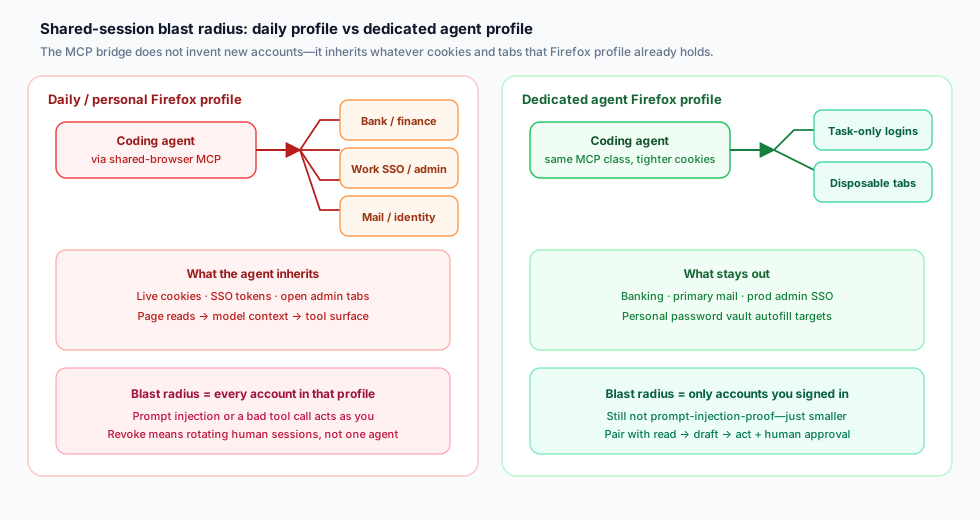
Figure 1. Left: daily profile fans cookies, SSO, and open sensitive tabs into the agent tool surface—blast radius equals every account in that profile. Right: a dedicated agent profile holds only task logins; banking, primary mail, and prod admin SSO stay out. Modes still do not stop prompt injection; they only shrink what is reachable.
Anthropic gives the Chrome version of the same move: separate profile without sensitive accounts; avoid banking, healthcare, government, and sensitive work sites; screenshots of visible tabs join the conversation (Use Claude in Chrome safely). Kitsune’s Firefox guidance matches: dedicated profile; keep banking, mail, and work SSO out; treat sessions, screenshots, and tool logs as sensitive (Kitsune README; guide — Security).
Figure 1 reading: shared-session MCP is rarely wrong as a pattern—it is wrong for that profile. Put task logins in the agent profile; leave the daily vault alone.
Mode ladder: read → draft → act
Once you accept a shared session, the next control is how far the agent may go before a human gate. Kitsune’s KITSUNE_MODE=read|draft|act (default act) limits both the tools published and the requests the bridge accepts (Kitsune guide — Task modes):
| Mode | What the agent can do (Kitsune) |
|---|---|
| read | Read tools + HTTPS/about:blank navigate/scroll; list-only tabs (new_tab for a background tab). No clicks, field writes, JS, submits, or file screenshots. |
| draft | Read surface + type/select/fill (and check with browse). No click, keypress, submit, dialog confirm, or JS. Ask-before-act forced for sensitive/payment-like targets. Sites may still autosave. |
| act | Full behavior, plus whatever ask-before-act policy you set separately. |
Ask-before-act is a separate opt-in (or lockable) policy for submits, payment-like pages, agent JS, cookie/storage, clipboard, and downloads. On Claude Code and Codex, elicitation asks in the client so approval never passes through the agent; without elicitation, a confirm token guards accidents but does not prove a human approved (Kitsune guide — Ask-before-act).
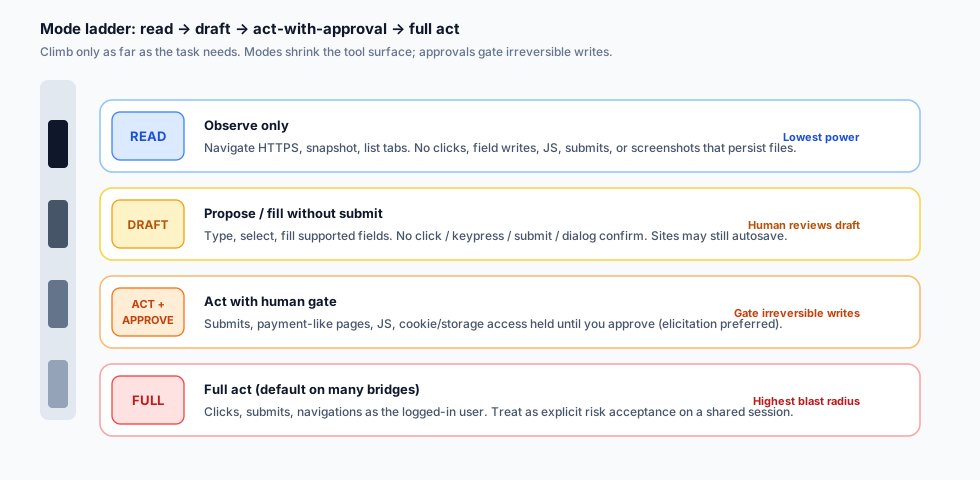
Figure 2. Climb only as far as the task needs. Read observes. Draft fills without submit. Act-with-approval gates irreversible writes. Full act is an explicit risk acceptance on a shared session—not the quiet default you want on a daily profile.
Map the ladder to work:
- Research →
read(or Claude in Chrome on trusted sites, manual approve). - Fill for a human to finish →
draft, then you submit. - Book, send, purchase, delete →
actonly with ask-before-act locked, on a profile that lacks accounts you cannot afford to lose. - Never treat chat “please don’t submit” as a substitute for elicitation or a locked policy.
Kitsune defaults user/other-client tabs to read-only (user_tab_read_only unless KITSUNE_USER_TABS=writable or an explicit handoff). That reduces interference with the tab you are viewing; it is not cookie isolation (Kitsune guide — Protecting your tabs).
Kitsune as an implementation case
Facts from the repo and PyPI—not an endorsement score.
What it is. Twin packages kitsune-browser-mcp and kitsune-browser (same version). The MCP package installs the browser package and exposes kitsune / bridge status (PyPI: kitsune-browser-mcp; GitHub). PyPI showed v0.7.1 when this article was sourced.
How it attaches. Agent → stdio MCP → local bridge (127.0.0.1 HTTP + bearer) → WebSocket to a Firefox-family extension (moz-extension:// only) → content scripts (Kitsune guide — How it works). Wrong Host headers are rejected; no CORS headers, so ordinary pages cannot call the API. That still does not stop prompt injection, local token theft, sensitive page reads, or acting as you.
Tool surface. Defaults to Playwright MCP’s 25 core tools (same names/schemas) while driving your browser. Extra groups via KITSUNE_CAPS; storage and history stay out of all because they touch cookies, clipboard, history, and bookmarks (Kitsune README — Choosing tools).
Install sketch (re-check docs before shipping). Claude Code: claude mcp add --scope user kitsune -- uvx --from kitsune-browser-mcp kitsune. Codex: codex mcp add kitsune -- uvx --from kitsune-browser-mcp kitsune. OpenCode: local mcp.kitsune command in opencode.json. Install the matching extension; keep the browser open (Kitsune README — MCP setup).
Ergonomics vs security. Background agent tabs and write-pausing while you type are UX. Kitsune’s shared-browser benchmark (tab-in-front vs Playwright MCP) is positioning, not a security proof (Kitsune README — Benchmark).
Comparison: session model, isolation, approvals, cookie ownership
Use the table to pick a fit for a workload. Do not treat it as a ranking.
| Dimension | Kitsune | firefox-bridge / Agent Bridge class | Playwright MCP | Claude in Chrome |
|---|---|---|---|---|
| Session model | Extension + local bridge on Firefox / Zen / LibreWolf you already have open | WebExtension + native messaging host on real Firefox tabs (firefox-bridge); similar live-profile bridge designs (e.g. Firefox Agent Bridge) | Launches Playwright-managed browser by default; optional extension path to existing Chrome tabs | Chrome extension / side panel in the user’s Chrome |
| Who owns cookies | Your Firefox-family profile | Your Firefox profile | Playwright user-data dir, isolated memory profile, storage-state seed, or attached browser—depending on flags | Your Chrome profile (or org-managed profile) |
| Profile isolation | Operator-chosen: dedicated profile strongly recommended; not automatic | Operator-chosen; same blast-radius math as any shared session | Built-in persistent / --isolated / --user-data-dir / --storage-state controls |
Anthropic recommends a separate profile without sensitive accounts |
| Approval / mode gates | KITSUNE_MODE read/draft/act; opt-in/lockable ask-before-act; user tabs read-only by default; elicitation on Claude Code / Codex |
Tool- and site-policy varies by project (e.g. blacklist confirmations on firefox-bridge)—verify in that repo’s README | Client-level permissions; Playwright MCP states it is not a security boundary | Classifiers, action screening, manual vs automatic approve, site block/allow lists (Team/Enterprise) |
| Named coding agents | Claude Code, Codex, Pi, OpenCode documented | Claude Code, Codex called out on firefox-bridge | Broad MCP client list including Claude Code and Codex | Claude Code / Cowork / Chrome side panel per Anthropic |
| Not a fix for | Prompt injection; local token theft; heuristic redaction gaps | Same shared-session class risks | Untrusted pages in a powerful automation browser still need host isolation and client policy | Prompt injection risk “not zero”; screenshots capture visible sensitive UI |
Sources for the rows: Kitsune README / guide, kitsune-browser-mcp on PyPI, firefox-bridge, firefox-agent-bridge, Playwright MCP README, Use Claude in Chrome safely.
Selection shortcuts
- Need logged-in Firefox research in background tabs while you keep typing → shared-session class (Kitsune or a firefox-bridge / Agent Bridge tool); start in
readordraft. - Need repeatable automation with wipeable state → Playwright MCP with isolated or disposable profiles; do not confuse its optional extension attach with “safe shared daily Chrome.”
- Need Chrome + Anthropic’s permission UX and org allowlists → Claude in Chrome, still on a non-sensitive profile.
- Need debugger / profiler depth in Firefox → Mozilla’s Firefox DevTools MCP is a different product (remote-debugging attach), not a shared-session convenience layer (Kitsune positioning table; firefox-devtools-mcp).
Practical rules for Claude Code, Codex, and OpenCode
Apply whether you pick Kitsune, another Firefox bridge, Playwright MCP, or Claude in Chrome.
- Dedicated profile first. Sign in only to accounts the task needs. Kitsune and Anthropic both say this; treat exceptions as documented risk acceptance.
- Lowest mode that finishes the job. Set
KITSUNE_MODE=readordraftin MCP env—not only in chat. Mode changes what the bridge accepts. - Lock ask-before-act for
act. PreferKITSUNE_ASK_BEFORE_ACT=1. Prefer elicitation clients (Claude Code, Codex) so approval is not a replayable token. - Leave
storage/historyoff unless you have a written reason for cookies, clipboard, history, or bookmarks. - Keep user tabs read-only. Agent-owned background tabs only; no
KITSUNE_USER_TABS=writableon a banking laptop. - Separate MCP regs by trust. Research (read-mode) and checkout helpers must not silently share one loose config.
- OpenCode / JSON clients: put mode and caps in the server
envnext to the command (Kitsune README — OpenCode). - Playwright MCP when you do not need human cookies. Prefer isolated/disposable profiles. Playwright MCP is not a security boundary—use client permissions (Playwright MCP README — Security).
- Claude in Chrome: trusted sites first; manual approve on unfamiliar hosts; no side panel on regulated/sensitive pages; use org allowlists (safety; admin controls).
- Treat the transcript as sensitive. Bridge audit redaction does not scrub MCP chat or model context.
What this does not solve
Say these before you connect the bridge.
Prompt injection. Kitsune: none of its controls prevent it (README; guide). Anthropic: classifiers help; residual risk is non-zero (Use Claude in Chrome safely). Removing submit tools reduces damage; it does not make page text trustworthy.
Hostile page content. Password/OTP/card redaction is heuristic. browser_evaluate can read what the page can; visually masked fields are not safely hidden from the agent (Kitsune guide — Security).
Cookie dump / session theft. Enabling storage tools—or agent JS on a page that can exfiltrate tokens—ends the shared session. Trusting your coding agent is not trusting every URL it opens.
Confirm tokens without elicitation. A token returned to the model can be replayed by the model—accident guard, not human proof (Kitsune guide).
Local processes as you. Localhost bearer tokens are in scope for anything running as your user.
Daily profile + sensitive accounts. Kitsune and Claude in Chrome both say no. Doing it anyway accepts one injected instruction acting on bank, mail, and admin SSO.
Checklist before connecting any shared-browser MCP
Use this as a go / no-go before claude mcp add, codex mcp add, or an OpenCode mcp block.
- Name the profile. Is it a dedicated agent profile, or your daily one? If daily, stop.
- Inventory logins in that profile. List SSO, mail, cloud consoles, payment sites. Remove anything the task does not need.
- Pick the mode.
read,draft, oract—written down, set in env, not only asked in chat. - Pick the approval posture. Locked ask-before-act / manual approve / elicitation client. Confirm how decline looks in your client.
- Cap tools. Disable storage, history, evaluate/JS, and download groups unless required.
- Confirm tab ownership rules. Prefer agent-owned background tabs; keep user tabs read-only.
- Decide wipe procedure. How do you clear cookies or delete the profile after a bad session?
- Decide monitoring. Who watches unexpected navigations, new domains, or sudden “help me export my data” behavior?
- Write the exception. Any shared daily-profile use needs an owner, a time box, and a compensating control (usually: human on every submit + no storage tools).
- Re-read first-party security pages for the exact bridge you installed—READMEs change faster than blog posts.
Closing: share the session only when the cookies are worth the risk
Shared Firefox MCP is powerful because it is honest: the agent is you, with your cookies. Kitsune makes that usable for Claude Code, Codex, and OpenCode via background tabs, read/draft/act, and optional ask-before-act. firefox-bridge / Agent Bridge sit on the same axis. Playwright MCP owns an automation browser. Claude in Chrome adds Anthropic classifiers and org controls—and still says keep sensitive accounts out.
Containment test: if a prompt-injected page can spend money, read mail, or change prod IAM, you picked the wrong profile—or climbed the mode ladder too far.
Session model first. Mode second. MCP third.
Sources (primary)
- Kitsune — GitHub README; guide (modes, security, ask-before-act); PyPI kitsune-browser-mcp
- Playwright MCP — microsoft/playwright-mcp README (profiles, isolation, security)
- Claude in Chrome — Use Claude in Chrome safely; admin controls
- Competing Firefox bridges — raychao-oao/firefox-bridge; 1jehuang/firefox-agent-bridge; related positioning via mozilla/firefox-devtools-mcp